
RedThunder One Handed Gaming Keyboard RGB Backlit 35 Keys Portable Mini Gaming Keypad Ergonomic Game Controller for PC Gamer
4.4Editor score
35 key layout
RGB backlit modes
Macro recording support
Explore the top left handed gaming keyboards for 2026 featuring ergonomic layouts magnetic switches and programmable keys for ultimate performance.
Left handed gaming keyboards offer unique ergonomic solutions for players who prefer using their dominant hand for input devices. These specialized layouts enhance comfort during long sessions and reduce strain on wrists and shoulders significantly.
We compared ten real products based on switch type ergonomic design connectivity options and overall build quality. Each entry provides detailed insights into features that matter most to competitive gamers and professionals seeking efficiency.
Every pick highlights standout strengths and honest trade-offs to help you find the perfect match for your setup. Please note that product availability and pricing may change over time so verify details before purchasing.
4.4Editor score

4.6Editor score

4.6Editor score
This side by side comparison evaluates all ten products across key dimensions including switch technology ergonomic design and connectivity options to help you make an informed decision.


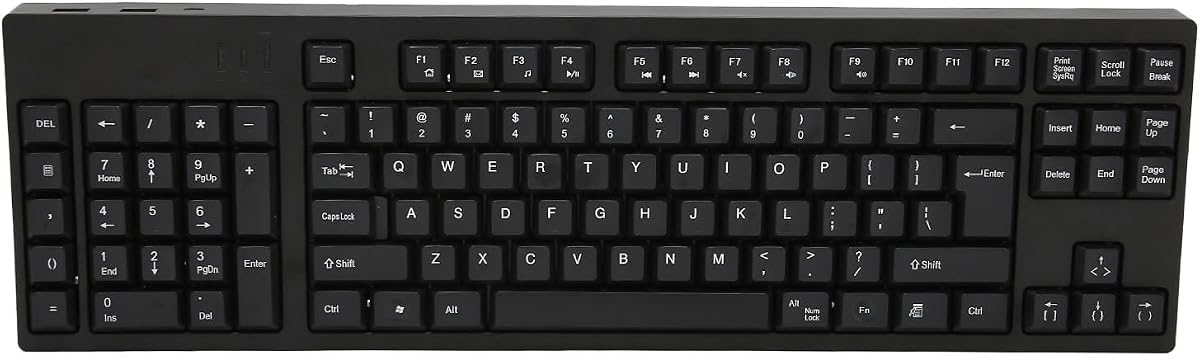

The RK ROYAL KLUDGE L98 stands out as a top contender for left handed gamers seeking a full mechanical keyboard experience. Its unique southpaw layout moves the numpad to the left freeing up mouse space on the right side for enhanced comfort.
We may earn a commission when you buy through this link, at no additional cost to you.
This keyboard features a gasket mounted structure with PBT keycaps delivering a soft and cushioned typing feel that reduces vibration during intense sessions. The five layer sound dampening system ensures a satisfying and quiet typing experience.
While the price reflects its premium build quality it may be a consideration for budget conscious buyers. The tri mode connectivity and massive battery life offset this for users needing versatility across multiple devices.
Recommend this for left handed gamers who value ergonomics and typing quality alongside gaming performance. The hot swappable design allows future customization to match evolving preferences.
Moving the numpad left frees right hand space for mouse movement reducing strain during long gaming sessions.
Soft cushioned typing feel with reduced vibration enhances comfort and reduces fatigue over extended use.
We may earn a commission when you buy through this link, at no additional cost to you.
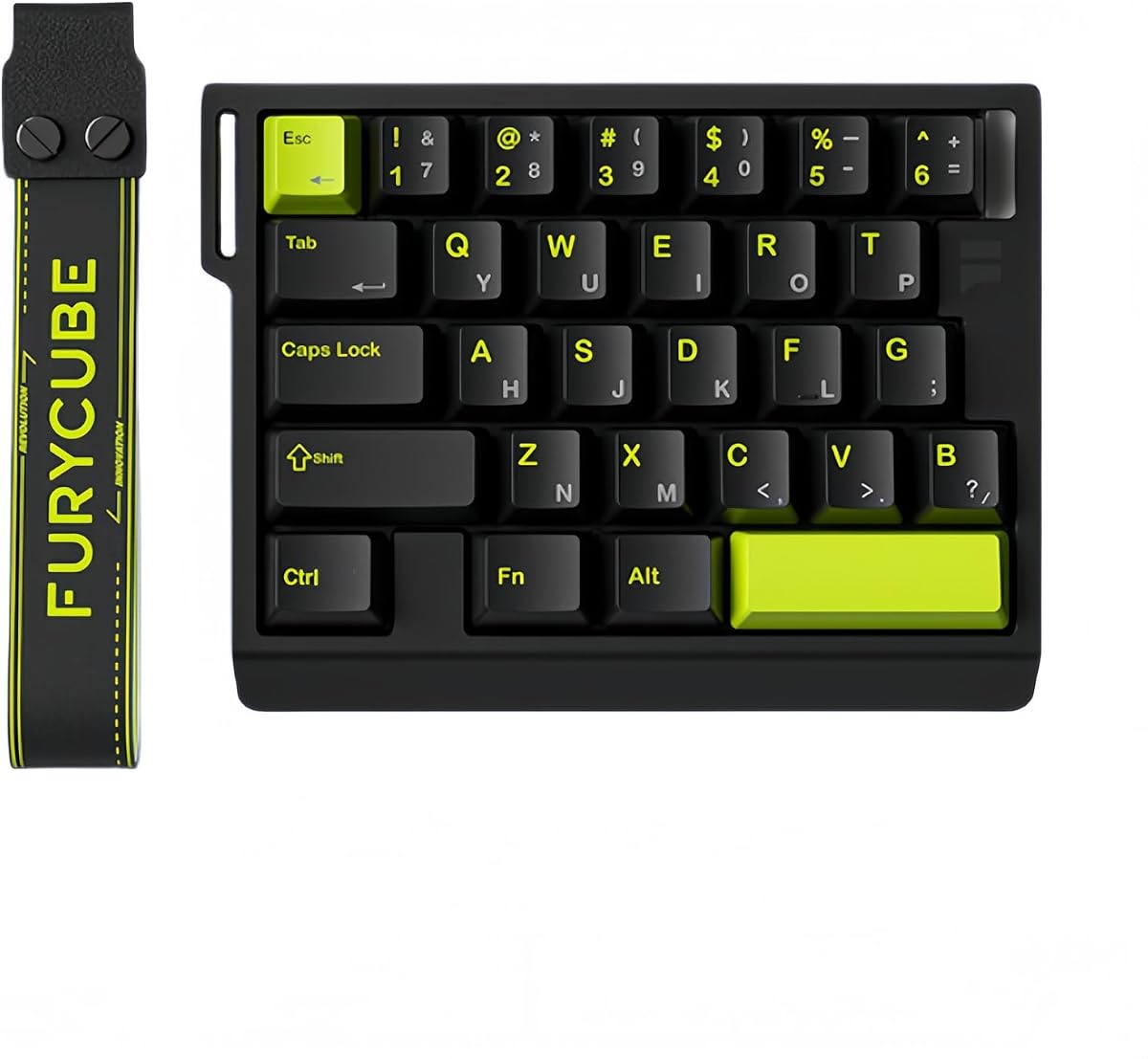
The RedThunder One Handed Gaming Keyboard offers an affordable entry point for gamers seeking a compact left handed solution. Its 35 key layout covers essential gaming commands while saving desk space for mouse movement.
We may earn a commission when you buy through this link, at no additional cost to you.
Built with a game chip for faster response speed this keyboard supports macro recording for complex actions. The RGB backlit adds visual flair with multiple colors and modes to personalize your setup.
Limitations include non mechanical switches and a limited key count which may not suit all gaming genres. However the ergonomic wrist rest and portable design make it ideal for casual gamers or travelers.
Choose this if you need a budget friendly option for MMO or strategy games requiring quick command access. The plug and play setup ensures easy integration without driver installation.
Small size saves desk space and makes it easy to carry for travel or different setups.
Record and execute complex key sequences with dedicated macro keys for enhanced gameplay efficiency.
We may earn a commission when you buy through this link, at no additional cost to you.
The AZERON Keyzen represents the pinnacle of one handed gaming keyboards with its advanced Hall Effect joystick and fully mappable keys. Designed for competitive play it provides drift free analog movement control unmatched by traditional controllers.
We may earn a commission when you buy through this link, at no additional cost to you.
Featuring Cherry MX mechanical switches the Keyzen delivers tactile precision and durability essential for high level gaming. The 3D printed modular construction allows future upgrades and replacement of components as needed.
The premium price tag reflects the high end components and customization potential but may not suit casual users. A learning curve exists for mastering the joystick and software but the performance gains are significant.
Recommend for serious FPS or strategy gamers demanding maximum control and customization. The ergonomic adjustability ensures comfort for various hand sizes during marathon sessions.
Drift free analog thumbstick enables precise movement and mouse functionality with customizable sensitivity zones.
Reliable mechanical switches provide consistent tactile feedback and longevity for competitive gaming demands.
We may earn a commission when you buy through this link, at no additional cost to you.
The AZERON Gaming Keypad Cyborg II offers an alternative approach for right handed gamers who want left hand input. Its Hall Effect thumbstick provides analog movement options that traditional keyboards cannot match for FPS titles.
We may earn a commission when you buy through this link, at no additional cost to you.
With 30 individually connected inputs this keypad allows extensive customization for macros and binding. The 3D printed construction ensures a tailored fit while modular design supports future upgrades via software.
Sizing recommendations suggest it fits hand sizes from 6.3 to 7.5 inches so verify comfort before purchasing. The exclusive software provides fine tuned control but adds complexity compared to simpler plug and play devices.
Choose if you seek analog thumbstick functionality and deep customization for competitive gaming. The unique layout enables unique strategies and movement techniques unavailable on standard controllers.
Hall Effect technology enables 360 degree analog control with customizable dead zones and sensitivity settings.
Design allows future hardware enhancements and software updates to extend device lifespan and capability.
We may earn a commission when you buy through this link, at no additional cost to you.
The AJAZZ AK029 targets competitive FPS gamers with its magnetic switches and rapid trigger technology. This allows instant key resets for double taps and smooth strafing giving a tactical advantage in fast paced titles.
We may earn a commission when you buy through this link, at no additional cost to you.
An 8KHz polling rate ensures near zero latency so every command translates instantly on screen. The compact 29 key layout maximizes mouse space while the ergonomic wrist rest reduces hand fatigue during long sessions.
Being wired only limits portability but ensures stable connectivity crucial for esports. The limited key count means focusing on essential moves rather than complex macro setups common in other games.
Recommend for FPS players prioritizing speed and precision over feature variety. The acoustic structure and aluminum build provide a premium feel despite the compact dimensions.
Instant key resets enable lightning fast double taps and smooth movement without bottoming out keys.
8KHz polling rate reduces latency to 0.125ms ensuring real time response for competitive gameplay.
We may earn a commission when you buy through this link, at no additional cost to you.
This ergonomic left handed keyboard prioritizes health and productivity for business and accounting professionals. The patented natural shape keycaps reduce back and shoulder strain while the left numeric keypad frees up mouse space.
We may earn a commission when you buy through this link, at no additional cost to you.
Eight multimedia hotkeys streamline common tasks and the design targets reducing RSI and carpal tunnel risks. Compatibility spans multiple operating systems ensuring broad utility across different work environments.
While optimized for office work it lacks gaming specific features like RGB or rapid trigger. The design is functional but may appear dated compared to modern gaming focused peripherals.
Choose for professionals needing ergonomic input solutions without gaming aesthetics. The focus on posture improvement and wrist relief makes it a healthy investment for daily typing tasks.
Unique key structure reduces shoulder strain and improves posture during long typing sessions.
Ergonomic layout designed to minimize repetitive strain injuries common in office work environments.
We may earn a commission when you buy through this link, at no additional cost to you.
The Keychron C0 HE bridges the gap between gaming performance and cross platform usability. Its Hall Effect magnetic switches support rapid trigger for FPS titles while the web based configurator eliminates software installation needs.
We may earn a commission when you buy through this link, at no additional cost to you.
Full compatibility with Windows and macOS makes it ideal for users switching between systems. The 35 programmable keys cover most essential commands and per key RGB lighting allows customization for aesthetics.
Being wired ensures stable connection but reduces portability. The web based setup requires internet access which may be a drawback in offline environments compared to onboard memory options.
Recommend for content creators or gamers needing seamless OS switching. The combination of performance features and ease of setup offers strong value for versatile workflows.
Browser based tool allows mapping and RGB changes without installing dedicated software on any device.
Full compatibility with Windows and macOS ensures flexibility for multi system setups and streaming.
We may earn a commission when you buy through this link, at no additional cost to you.
This full layout left handed keyboard offers 109 keys including a dedicated left numpad for business and design work. The ergonomic layout aims to relieve right hand fatigue while the plug and play setup simplifies installation.
We may earn a commission when you buy through this link, at no additional cost to you.
With a perfect user rating it suggests high satisfaction among its target audience of accountants and designers. The material construction provides stable typing accuracy though it may not match premium gaming builds.
Micro USB connectivity is less modern than USB C which may limit port compatibility on newer systems. The simple design lacks RGB or advanced features but delivers reliability for professional environments.
Choose for office users needing a full keyboard without sacrificing ergonomic benefits. The high rating indicates strong performance for data entry and daily productivity tasks.
Complete keyboard with left numpad ensures all essential keys remain accessible for professional work.
No drivers required enables immediate use connecting via Micro USB for quick integration.
We may earn a commission when you buy through this link, at no additional cost to you.
The FKZ M30HE combines rapid trigger technology with hot swappable magnetic switches for deep customization. Adjustable actuation down to 0.01 mm allows fine tuning for personal typing preferences and game needs.
We may earn a commission when you buy through this link, at no additional cost to you.
An 8KHz polling rate supports competitive play while the north facing RGB LEDs provide vibrant lighting effects. The 30 key layout focuses on essential functions with dynamic keystrokes enabling one key to bind multiple operations.
Lower user rating compared to competitors suggests potential inconsistency or software limitations. The web driver offers remapping but may lack the polish of more established brands in the category.
Recommend for enthusiasts willing to customize settings manually. The hot swap feature allows experimenting with different switches to find ideal tactile feedback without replacing the whole device.
Swap switches easily to test different tactile or linear options without soldering or new hardware.
Precise actuation point adjustment allows tuning sensitivity for specific game mechanics or typing styles.
We may earn a commission when you buy through this link, at no additional cost to you.
The A4tech ergonomic left handed keyboard emphasizes posture improvement and strain reduction for daily work. Its wired USB connection provides stable performance while eight multimedia hotkeys offer quick access to essential functions.
We may earn a commission when you buy through this link, at no additional cost to you.
Designed to reduce shoulder strain and carpal tunnel risks this keyboard suits professionals typing long hours. The simple design focuses on health benefits rather than aesthetic gaming features.
Gaming capabilities are minimal compared to specialized gaming keyboards. Users seeking RGB or rapid trigger may find this limiting but value the health focused design.
Recommend for business users prioritizing ergonomics over gaming performance. The price point and health benefits make it a practical choice for office work environments.
Ergonomic layout targets reducing back and shoulder strain during extended typing sessions.
Eight dedicated keys streamline common tasks improving workflow efficiency for daily office use.
We may earn a commission when you buy through this link, at no additional cost to you.
Selecting the right left handed gaming keyboard depends on your specific needs including switch technology layout and ergonomic features.
Left handed keyboards come in full layouts with numpads or compact one handed layouts. Full layouts suit accounting and general work while one handed designs free mouse space for gaming.
Choose a layout matching your primary tasks and desk space constraints.
Mechanical switches offer tactile feedback while magnetic Hall Effect switches provide rapid trigger and adjustable actuation. Gaming often benefits from magnetic switches for competitive responsiveness.
Select switch type based on whether you prioritize gaming speed or general typing feel.
Options include wired USB wireless Bluetooth and 2.4GHz dongles. Wired ensures lowest latency but wireless offers cable management benefits.
Consider your need for stability versus portability when choosing connectivity.
Features like wrist rests and natural key shapes reduce strain during long sessions. Look for designs that support healthy posture especially for daily work.
Prioritize ergonomic elements to prevent repetitive strain injuries over time.
Programmable keys and macro support enhance workflow efficiency. Some models allow per key RGB and onboard profiles for quick switching.
Assess how much control you need over key mappings and lighting effects.
Materials like aluminum alloy and PBT keycaps increase durability. Gasket mounted structures improve typing comfort and acoustic quality.
Invest in robust materials if you expect heavy daily use.
Wireless models vary widely in battery capacity. High mAh ratings ensure longer use between charges especially with RGB lighting.
Check battery specs if you plan to use the keyboard untethered frequently.
Ensure support for your operating system whether Windows macOS or Linux. Web based configurators offer cross platform flexibility.
Verify OS support before purchasing to avoid software issues.
Connect the keyboard via USB or Bluetooth and install any required software for key mapping. Some models offer plug and play setup while others need drivers for full functionality.
Customize key bindings to match your gaming or work habits. Use macro features to automate complex tasks and reduce physical effort during extended sessions.
Keep the keyboard clean by regularly removing dust and debris. Avoid liquid spills and store in a cool dry place when not in use to extend lifespan.
Yes many left handed keyboards are usable by right handed users though layouts may feel unusual. Models with standard layouts but reversed numpads offer the best flexibility.
Rapid trigger allows keys to reset instantly without fully releasing the key. This enables faster double taps and movement adjustments critical for competitive FPS titles.
Magnetic switches have no physical contacts so wear is minimal. Keep them clean from dust and debris to ensure consistent actuation without physical friction parts.
Yes many models include full numeric keypads and ergonomic layouts optimized for data entry. Look for keys with good tactile feedback for precision typing.
Wired provides lower latency which is preferable for competitive gaming. Wireless offers convenience and cable management but check polling rates for minimal lag.
Most provide software or web configurators for key remapping. Follow manufacturer instructions to assign macros or custom functions to specific keys easily.
Standard keys allow easy removal for cleaning. Use compressed air to remove dust and wipe surfaces with a damp cloth avoiding liquid on electronics.
Battery life ranges from hours to hundreds of hours depending on features and usage. RGB lighting significantly reduces runtime so expect 50 to 300 hours.
The RK ROYAL KLUDGE L98 RedThunder and AZERON Keyzen lead this lineup with unique strengths in ergonomics budget value and premium features.
Prioritize switch technology and layout based on whether you need competitive FPS performance or general productivity comfort.
Always verify current availability and pricing since product details may change over time before making your purchase.